How to Create a Brand Media Pack Before You Launch
A brand media pack is the single source of truth for your product name, tagline, length-banded blurbs, links, screenshots, and creative rules—so every post and partner uses the same facts.
NewName Editorial
Editorial Team
Most early-stage teams do not fail at branding because the logo is ugly. They fail because five channels say five slightly different things: Product Hunt says one sentence, X says another, a journalist gets a third paste from Slack, and the Chinese landing page drifts from English.
A brand media pack (sometimes called a brand pack or founder media kit) fixes that. It is not a press-only PDF. It is a single source of truth—copy bands, links, screenshots, creative rules, and accuracy guardrails—so anyone posting about your product can stay consistent without pinging the founder.
This guide walks through what belongs in that pack, using the structure we ship for companies on NewName.ai (a living list of new AI startups). At the end we show how our Brand Pack Creator builds the same layout from your URL—useful if you want the folder without assembling it by hand.
What a brand media pack is (and is not)
It is: reusable launch materials you control—product name, positioning, short/mid/long blurbs, official + social URLs, website screenshots, platform post drafts, creative rules, and "what we will not claim."
It is not: a paid exclusive write-up about your product on a directory, and it is not a substitute for legal trademark work. On NewName, that written report path is separate (Media Kit); Brand Pack Creator is the automated assets path.
If a partner asks "send me your media kit," what they usually need is this pack: copy they can paste and assets they can attach, not a 40-page brand book.
The sections that actually get used
Skip the 60-page PDF. Ship a navigable pack with these blocks (this is the sidebar we use on a live Brand Pack):
- English copy — name, tagline, positioning, length-banded descriptions
- Official site & social links — inventory; mark Missing instead of inventing handles
- Brand assets — logo files you already have (do not fabricate marks)
- Publish videos / clip slots — reserve folders even if video is not ready
- Creative rules — tone, banned phrases, visual do/don't
- Platform template references — X / LinkedIn / Product Hunt drafts
- Use cases — where each blurb length goes
- Accuracy guardrails — claims you will not make without a source
- Localized copy & assets — e.g. Chinese, if that market matters
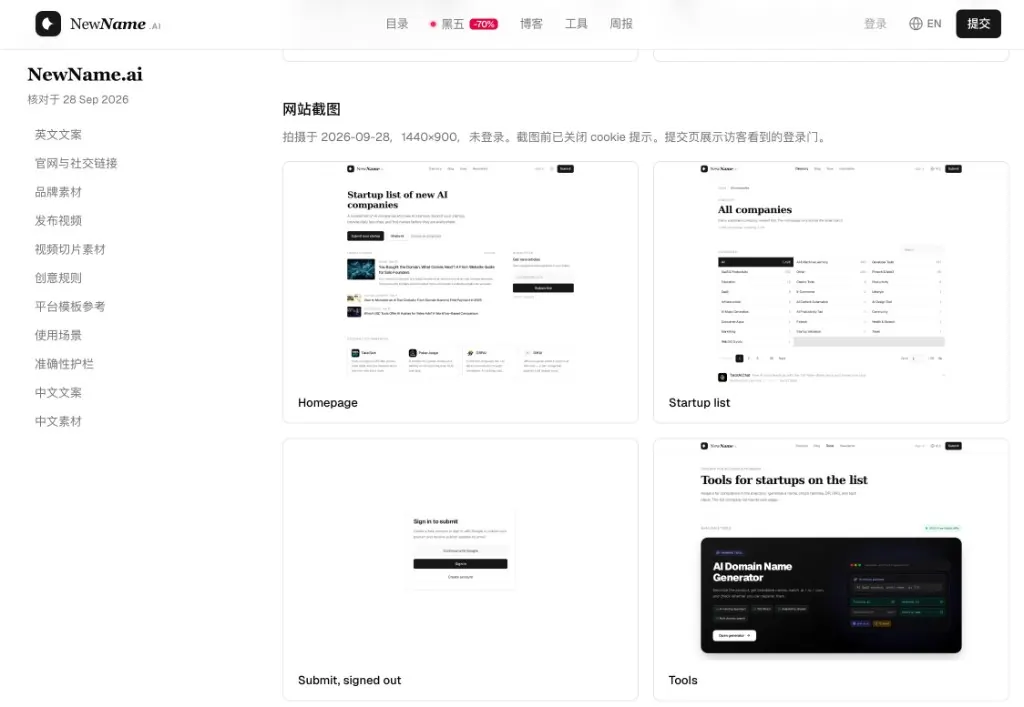
Example: NewName.ai Brand Pack — left nav for each section; right panel shows homepage + first-level page screenshots (not deep product URLs).
Step 1: Lock the English copy bands first
Start with language, not Figma. Write these four layers once and reuse them everywhere:
| Layer | Target length | Where it lands |
|---|---|---|
| Product name | Exact string | App Store, schema, nav |
| Tagline | One sentence | Hero, LinkedIn headline |
| Positioning | 2–4 sentences | About, investor one-pager |
| 120–140 chars | Bio / PIN / PH tagline | |
| 200–250 chars | X bio, short directory blurbs | |
| 350–500 chars | Product page intro, email intros |
Rules that save weeks of rewrite:
- One product, one sentence. Secondary tools (domain checkers, generators) stay helpers—not the core claim.
- Count characters, do not guess. Paste into a counter before shipping bios.
- Never invent missing facts. If you have no X account, the pack should say Missing—not invent a handle.
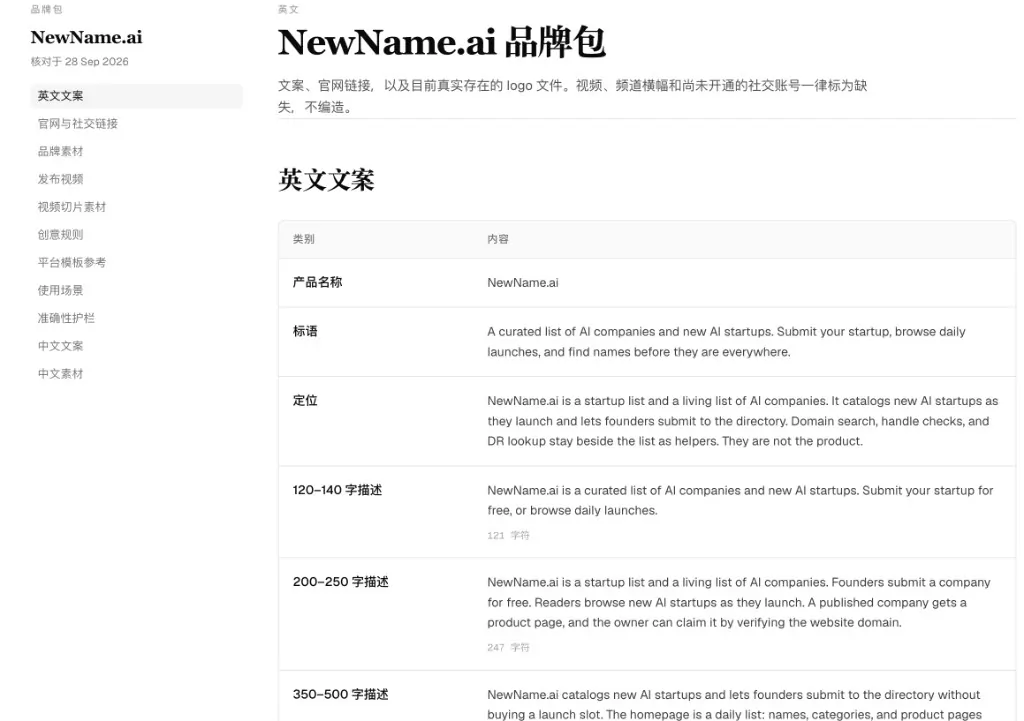
Example English copy section: name → tagline → positioning → 120 / 250 / 500 character bands with live character counts.
Step 2: Inventory links and screenshots like evidence
Journalists and directory editors trust packs that look verifiable:
- Canonical https product root (no UTM clutter)
- Social URLs that resolve; empty slots labeled Missing
- Homepage + first-level pages (pricing, about, tools)—usually enough. Deep
/products/fooURLs go stale fast and bloat the ZIP.
Cap screenshot count (we use a hard max of 20). Prefer clarity over a collage of every route.
Step 3: Add creative rules and accuracy guardrails
Two short lists beat a style guide nobody reads:
Creative rules — voice (plain vs playful), whether you allow emoji, which color tokens are canonical, how the logo may sit on dark/light backgrounds.
Accuracy guardrails — examples we keep for NewName: do not claim funding rounds you cannot link; do not imply the directory is a naming agency; do not invent competitor rankings.
Guardrails are what stop a well-meaning intern from posting "#1 AI startup list worldwide" on launch day.
Step 4: Draft platform posts from the same source
Once bands exist, derive—not rewrite from scratch:
- X: hook from the 120–140 band + one proof line + link
- LinkedIn: positioning paragraph + soft CTA
- Product Hunt: tagline + first comment that mirrors the 350–500 band
Same facts, different length. That is the whole point of bands.
Step 5: Localize only after English is stable
If you sell into Chinese-speaking markets, add 中文文案 and 中文素材 as parallel sections—not a machine-translated afterthought bolted onto English. Translate positioning first; then rebuild the character bands (Chinese character counts are not 1:1 with English).
DIY checklist (ship this week)
- Exact product name string locked
- Tagline + positioning approved by founder
- Three length bands with real character counts
- Official URL + social inventory (Missing allowed)
- Homepage + key first-level screenshots
- Creative rules + accuracy guardrails (10 bullets total is enough)
- X / LinkedIn / PH drafts derived from bands
- Optional: second language section
- One ZIP or one hosted page shared with the team
Faster path: NewName Brand Pack Creator
We run Brand Pack Creator because founders on our list kept sending us half-finished Notion docs. Paste your site URL, pick languages, pay from $9.99 (one language; +$3.99 per extra language). You get a hosted pack page (90 days) plus a ZIP with copy, link inventory, brand-colored social cards (1200×630), first-level screenshots, creative rules, guardrails, and an APPLY.md you can paste into Cursor or Claude to wire meta tags into your own site.
Launch video is not in the base pack—the ZIP reserves an empty launch-video/ folder for later.
| Brand Pack Creator | Media Kit | |
|---|---|---|
| Output | Automated launch assets | Human exclusive product report |
| Price | from $9.99 | $59.99+ |
| Directory article | Not included | Permanent article page |
Start here: Brand Pack Creator. Need a written report instead? Use Media Kit.
Bottom line
A brand media pack is how you stop arguing about "the right blurb" in Slack. Write the bands, inventory the links, attach real screenshots, write ten lines of rules—and keep every channel on the same facts. Build it yourself with the checklist above, or generate the same structure from your URL with Brand Pack Creator.