FlowManual
AI pre-marks your construction documents so you catch the costly line before you sign.
NewName Editorial
Editorial Team
Construction projects lose money at two precise moments: when a signed contract silently adds scope that was never in the bid, and when a vendor invoice drifts off the locked buyout price. The first mistake costs $5,000 to $10,000 per missed change; the second can reach $100,000 on a single project. FlowManual, an AI-native back office for contractors, does not claim to prevent these losses by replacing human judgment. Instead, it pre-marks the documents—specs, contracts, quotes, invoices—so that the human reader catches the costly line before it becomes a problem.
The $10,000 line hides on page 318
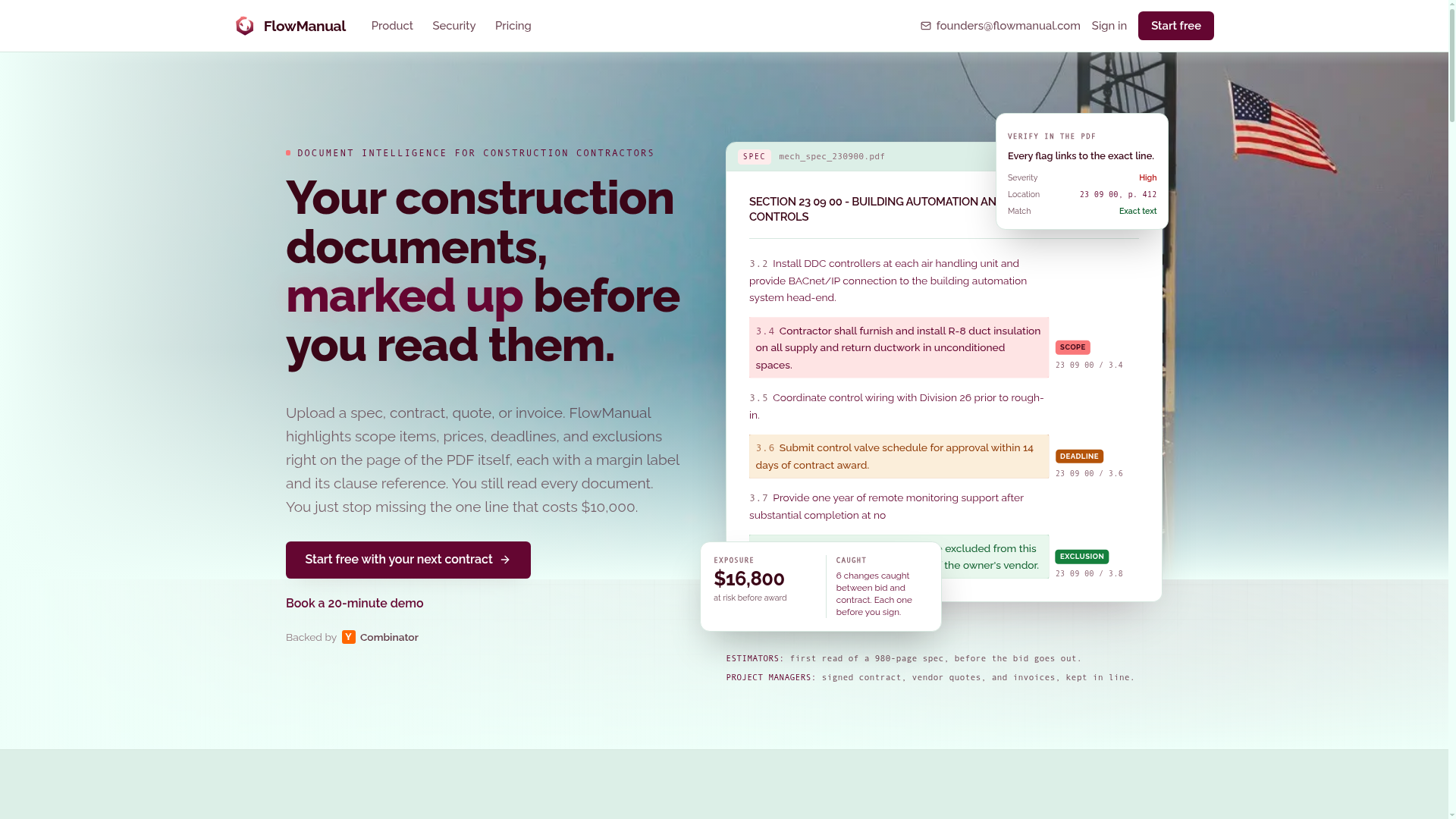
The homepage makes the pitch with a specific, uncomfortable example: a subcontract agreement where the clause that decides who owns the cost sits on page 318 of 512. By the time anyone finds it, the work has already started. FlowManual's answer is not to summarize the document or extract a risk score. It highlights the exact line, adds a margin label (SCOPE ADDED, EXCLUSION, DEADLINE), and links back to the clause reference. You still read every page, but you stop missing the one line that costs $10,000.
This is a different philosophy from the typical AI copilot that promises to read for you. FlowManual positions itself as a markup layer, not a reader. The tagline on the site is direct: "Your construction documents, marked up before you read them." The emphasis is on the human still reading, but with the document already annotated. It is a subtle but important distinction for a risk-averse industry.
Document intelligence, not document reading
The product calls itself "document intelligence for construction contractors." The intelligence is not in generating new content but in identifying what matters in existing documents. Upload a spec, contract, quote, or invoice, and FlowManual highlights scope items, prices, deadlines, and exclusions, each with a margin label and clause reference. Every highlight links back to the exact line in the PDF, so the user can verify the finding in context.
The underlying model is not disclosed, but the security page notes that "the model never sees your files, only extracted text." This is a meaningful architectural choice: it suggests a pipeline that extracts text from the PDF, processes it, and then maps findings back to the original page. The audit trail shows a provider (Anthropic) and a keyed prompt digest, indicating a controlled, logged AI process. This is not a black box; it is a tool that produces verifiable outputs.
Before you sign: bid versus contract
The core workflow is comparing the bid you submitted to the contract you are about to sign. A 500-page contract rarely matches the bid line for line. FlowManual puts the two side by side and ranks every difference by severity and dollar impact. The example on the site shows a mechanical bid with R-6 duct insulation on exposed supply ductwork, while the contract specifies R-8 on all supply and return ductwork, conditioned and unconditioned. The flag reads SCOPE ADDED, with a dollar impact of +$8,400. Another difference shows an exclusion dropped, which could also have cost implications.
The key phrase is "Severity and dollar impact are estimates to triage by. You confirm each one in the PDF." FlowManual does not claim to know the exact cost of a scope change; it provides an estimate to help prioritize what to review. The human estimator still makes the final call. This is a practical approach that respects the complexity of construction contracts.
After buyout: invoice versus locked price
The second major workflow is checking invoices against the locked buyout price. Invoices drift off the locked price a line at a time, and left unchecked on one project, this has cost contractors $100,000 or more. FlowManual compares each invoice to the buyout and flags the difference, with the dollar amount on every line. The example shows a buyout for RTU-3 at $36,600, but the invoice is $39,800, a +$3,200 price up. It also flags a line item not on the buyout at all, +$2,400. The total caught is +$5,600.
This is a concrete, measurable benefit: catching price drift before it is paid. The site claims that this is "benchmarked against your price history before it gets paid," suggesting that FlowManual uses historical pricing data to identify anomalies. This is more than simple text comparison; it is a form of purchasing intelligence.
The workbench: takeoff pins and audit trails
Beyond the two main workflows, FlowManual includes a workbench with tools that run alongside the document reading. Takeoff counts are a notable feature: every count is a pin on the sheet, and nothing enters the tally until you accept it. The rollup cross-checks the equipment schedule and flags a count that disagrees. For example, the takeoff shows 6 RTU pins, but the schedule lists 8, so the flag says "SCHEDULE LISTS 8." The user must review and accept or reject each pin. This is a human-in-the-loop design that prevents the AI from silently introducing errors.
The workbench also includes revision overlay, first-pass estimate, RFI log, submittal register, and change orders. These are all part of the same project workspace, so the documents and the tools are connected. The site emphasizes that "every number sits somewhere you can check it." This is a trust-building feature for an industry that is skeptical of AI.
What FlowManual refuses to automate
The FAQ is explicit: "Does it replace reading? No. You read every document. It makes sure nothing on any page gets missed." And "Will it replace my estimators? No. Your estimators still make every call. The file is just marked up before they open it." This is a deliberate positioning choice. FlowManual is not trying to automate the estimator out of a job; it is trying to make the estimator more effective.
This is a smart go-to-market strategy for construction, where trust is paramount and the cost of a wrong AI call can be catastrophic. By refusing to automate the final judgment, FlowManual reduces the risk of adoption. It also aligns with the security messaging: AES-256 encryption at rest, isolated per company, SSO, MFA, audit logging, and the model never seeing your files. The audit trail with a keyed prompt digest is a technical detail that IT teams can verify.
A name that says 'process' without saying 'AI'
The name FlowManual is a compound of "flow" and "manual." It suggests a process that is guided but still requires human hands. It does not contain "AI" or "intel," which is a deliberate choice for a product that wants to be seen as a tool, not a replacement. The domain flowmanual.com is clean and memorable, and the brand lockup uses a simple, industrial font. The tagline "The back office for construction contractors" is broader than the document intelligence pitch, but it reflects the ambition to become the operational hub for contractors.
The name has a slight ambiguity: it could be read as a manual for flows, or a flow for manuals. But in context, it works. It is not a generic SaaS name; it is specific to the idea of a guided process. The risk is that it does not immediately convey "construction" or "AI," but the product's positioning is clear enough on the landing page.
FlowManual is a product that understands its user. It does not promise to replace the estimator; it promises to make the estimator faster and safer. It does not claim to read the document for you; it marks it up so you read it better. In an industry where a single missed line can cost thousands, that is a compelling value proposition. The proof will be in whether contractors trust the flags enough to sign with fewer surprises. The product's design suggests they will.