Hyperfocus
A goals-first macOS planner that turns long-term intentions into daily focus blocks.
NewName Editorial
Editorial Team

Most productivity tools start with an inbox. Hyperfocus starts with a question: What do I actually want? That inversion is the entire product thesis, and it's why this free macOS planner feels less like another to-do app and more like a quiet rebellion against the capture-everything school of productivity.
The app's landing page puts it bluntly: "Task managers have it backwards." When work begins from an inbox, you're reacting to what's already there—processing, organizing, prioritizing, feeling busy without necessarily moving toward the future you want. Hyperfocus instead asks you to choose the few goals that matter most, then plan weeks and days around them, and finally make progress through focused work. It's a simple sequence, but the execution reveals careful thinking about where productivity tools usually fail.
The inbox is the wrong starting line
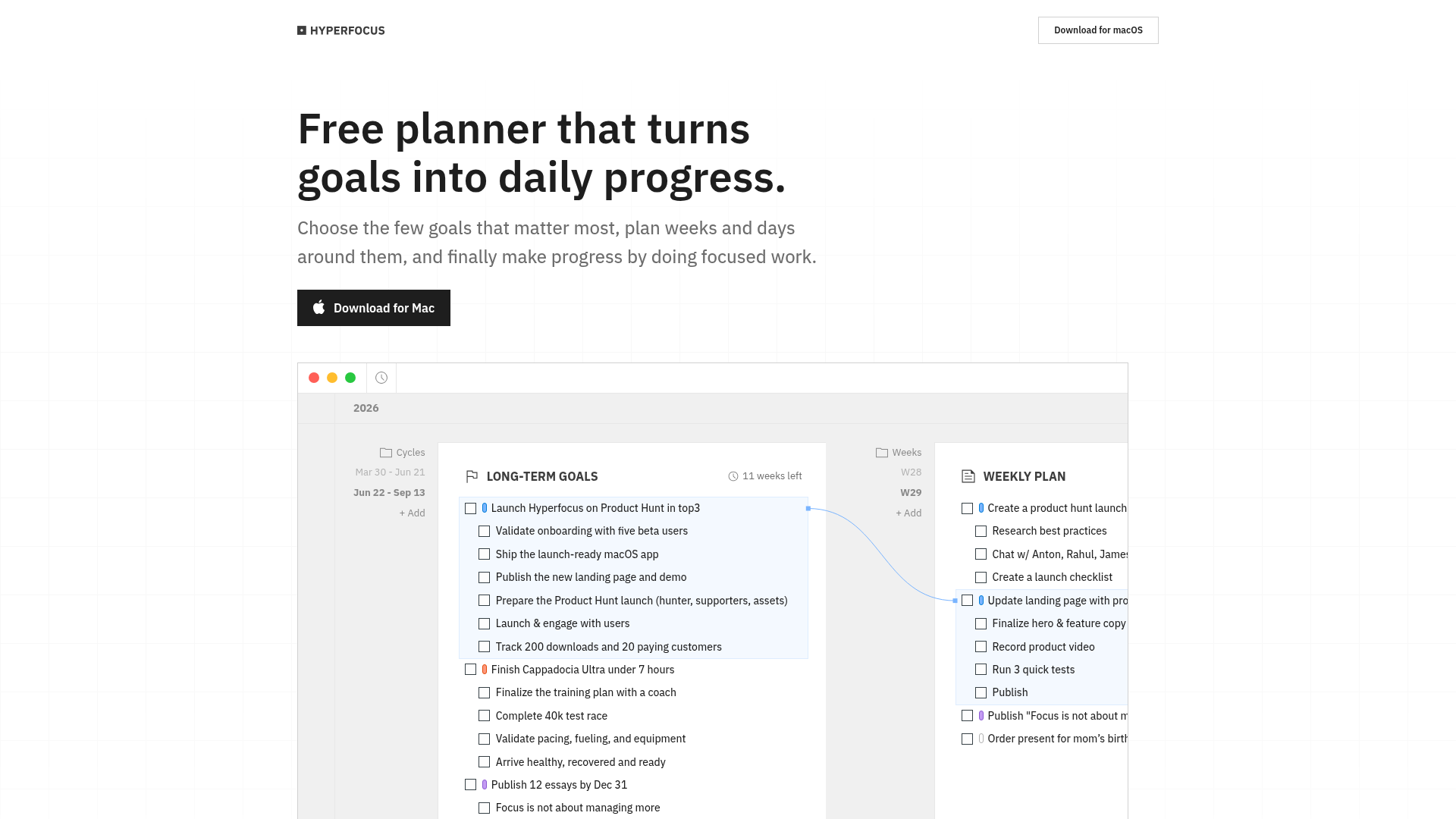
Hyperfocus's critique of task managers is not just marketing copy; it's baked into the product's structure. There is no inbox to dump tasks into. Instead, the workspace is organized around "Cycles"—time-bound periods like "Mar 30 - Jun 21" or "Jun 22 - Sep 13"—under which you define long-term goals. The example goals on the site are telling: "Launch Hyperfocus on Product Hunt in top3," "Finish Cappadocia Ultra under 7 hours," "Publish 12 essays by Dec 31." These are not tasks; they are outcomes with deadlines and emotional weight.
This is a deliberate philosophical stance. The maker, Dmitri Tcepelev, writes in the site's manifesto that when everything starts from an inbox, "you're riding in the passenger seat." Hyperfocus wants you in the driver's seat, starting from intention rather than obligation. It's a compelling argument, especially for knowledge workers drowning in reactive work. But it also means the tool demands a certain level of self-awareness—you have to know what matters before you can plan around it. That's a higher bar than "capture everything," and it's a risk the product accepts.
From goals to days: a three-level cascade
The core mechanism is a cascade: long-term goals feed weekly plans, which feed daily plans, which narrow down to a single next step. The interface shows this hierarchy explicitly—goals at the top, weeks in the middle, days at the bottom, each connected. A long-term goal like "Launch Hyperfocus on Product Hunt" breaks down into weekly actions like "Create a product hunt launch checklist" and daily tasks like "Write 1000 words for essay."
What's interesting is the emphasis on a "planning ritual." The site mentions "quick weekly and daily planning" that narrows everything down to one clear next step. This is a deliberate antidote to the overwhelm of endless task lists. Instead of a dozen things to do today, you get one focus. The app also includes "Focus Blocks"—time-boxed sessions (the example shows a 90-minute block) where you work on a single task. This is not a novel concept, but integrating it directly into the planning cascade makes the connection between intention and execution tangible.
The cascade is the product's backbone, and it's well-executed in the demo. But it raises a question: does the rigidity of three levels (goals, weeks, days) fit all types of work? For project-based work, yes. For ongoing responsibilities like email or maintenance, it might feel forced. Hyperfocus seems to accept this tradeoff, betting that focus on a few meaningful goals beats scattered completion of many trivial ones.
AI as a second opinion, not an autopilot
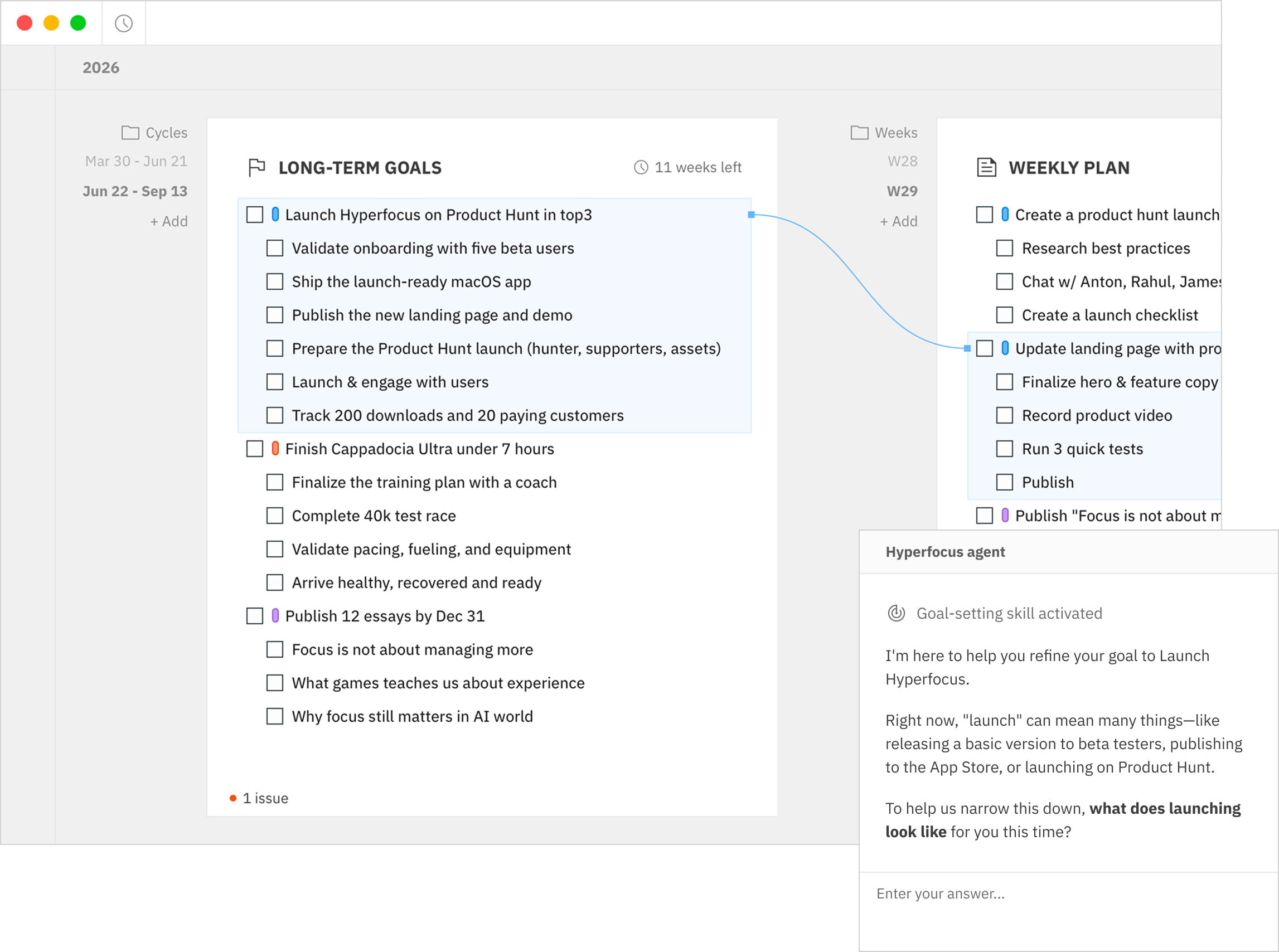
Hyperfocus AI is not a magic wand that plans your day for you. Instead, it acts as a critic and coach. The site describes it as "Grammarly, but for planning"—it reviews your goals and plans as you write, flagging vague outcomes, unrealistic scope, and missing next steps. The example conversation on the site shows the AI asking clarifying questions: "What would a successful launch look like for you?" "Do you have a specific target to measure that outcome?" It then suggests a step-by-step plan that the user can apply or adjust.
This is a thoughtful use of AI. Rather than generating plans from scratch (which often feel generic), it helps you refine your own intentions. The AI is optional—you can use Hyperfocus without it—and it's designed to be transparent: you can apply the feedback yourself or work through it with the assistant. This positions AI as a planning partner, not a replacement for thinking.
The implementation is also honest about costs. The FAQ states that all AI features use third-party providers, with a small amount of included usage. Once that runs out, you connect your own OpenRouter account and pay the provider directly—"I don't take a cut or make money from your AI usage," says the maker. This is a refreshingly straightforward approach in a landscape of opaque AI pricing, and it aligns with the product's local-first ethos.
Local-first and free: a deliberate counterweight
Hyperfocus is free forever. No Pro subscription, no paid plan, no AI credits to buy. The FAQ is emphatic: "There is no Pro subscription, paid plan, or pack of AI credits to buy." This is a bold choice for a productivity app, where subscription revenue is the norm. It suggests the maker is prioritizing adoption and trust over short-term monetization—or that Hyperfocus is a passion project with a different endgame.
Equally notable is the local-first architecture. Your goals, plans, and tasks are stored locally on your Mac, and the planner works offline. This is a privacy-forward stance that contrasts with cloud-dependent tools. The tradeoff is obvious: no cross-device sync, no web access. For a macOS-only app, this is a coherent choice—it's a tool for your primary machine, not a companion for your phone.
The free and local-first model is a double-edged sword. It removes barriers to entry and builds trust, but it also raises questions about sustainability. How will the maker fund development? The answer may be that Hyperfocus is a vehicle for other goals—the maker's own goals, as shown in the demo, include launching the product on Product Hunt and publishing essays. Hyperfocus might be as much a personal tool as a commercial product, which is both its charm and its limitation.
The macOS-only bet and its tradeoffs
Hyperfocus is currently available only for macOS. The site doesn't mention Windows or web versions, and the FAQ confirms it's macOS-only. This is a significant constraint in a cross-platform world. It immediately narrows the potential user base to Mac users, which is a deliberate choice—likely to maintain focus and quality, but also a strategic risk.
The bet is that the productivity market on macOS is large enough, and that the app's goals-first approach will resonate with a specific segment: professionals, creators, and students who own Macs and feel overwhelmed by task managers. The demo goals—launching a product, running an ultramarathon, writing essays—paint a picture of an ambitious, self-directed user. Hyperfocus is not for team collaboration or enterprise workflows; it's a personal planning tool for individuals who want to align their daily actions with their long-term aspirations.
This focus is both a strength and a limitation. It allows the product to be deeply tailored to a specific workflow, but it also means users who switch between devices or work in teams will find it lacking. The maker seems aware of this, positioning Hyperfocus as a complement to—not a replacement for—other tools. The question is whether the macOS-only constraint will ultimately help or hinder its growth.
Naming: a promise of intensity, with a caveat
The name "Hyperfocus" is a double-edged sword. On one hand, it perfectly captures the product's promise: intense, concentrated attention on what matters. It's memorable, evocative, and aligns with the focus-block mechanic. On the other hand, "hyperfocus" is a clinical term often associated with ADHD, describing an involuntary state of intense concentration that can be difficult to control. The name might inadvertently pathologize the very behavior it's trying to encourage, or it might resonate with users who struggle with focus and see the tool as a way to channel it productively.
The domain hyperfocus.in is clean and brandable, though the .in TLD (India) is an unusual choice for a global product—it might raise questions about origin or trust. The name is also generic enough that it could be confused with other products or concepts, but it's distinctive in the productivity space.
Overall, the name is a strong fit for the product's identity: it promises a state of deep work, and the app delivers a structure to achieve it. The caveat is that the name might overpromise—Hyperfocus can't force you to focus, it can only provide the framework. But as a brand, it's memorable and evocative, which is half the battle in a crowded market.
Hyperfocus is a thoughtful, opinionated planner that challenges the status quo of task management. Its goals-first cascade, AI-as-critic approach, and local-first, free model make it a distinctive entry in the productivity space. The macOS-only limitation and the sustainability questions are real, but for the right user—someone who wants to align daily actions with long-term goals—Hyperfocus offers a compelling, focused alternative. It's a tool that practices what it preaches: it knows what matters, and it builds everything around that.