Lead Recorder
See which ads and keywords drive real leads, not anonymous sessions
NewName Editorial
Editorial Team
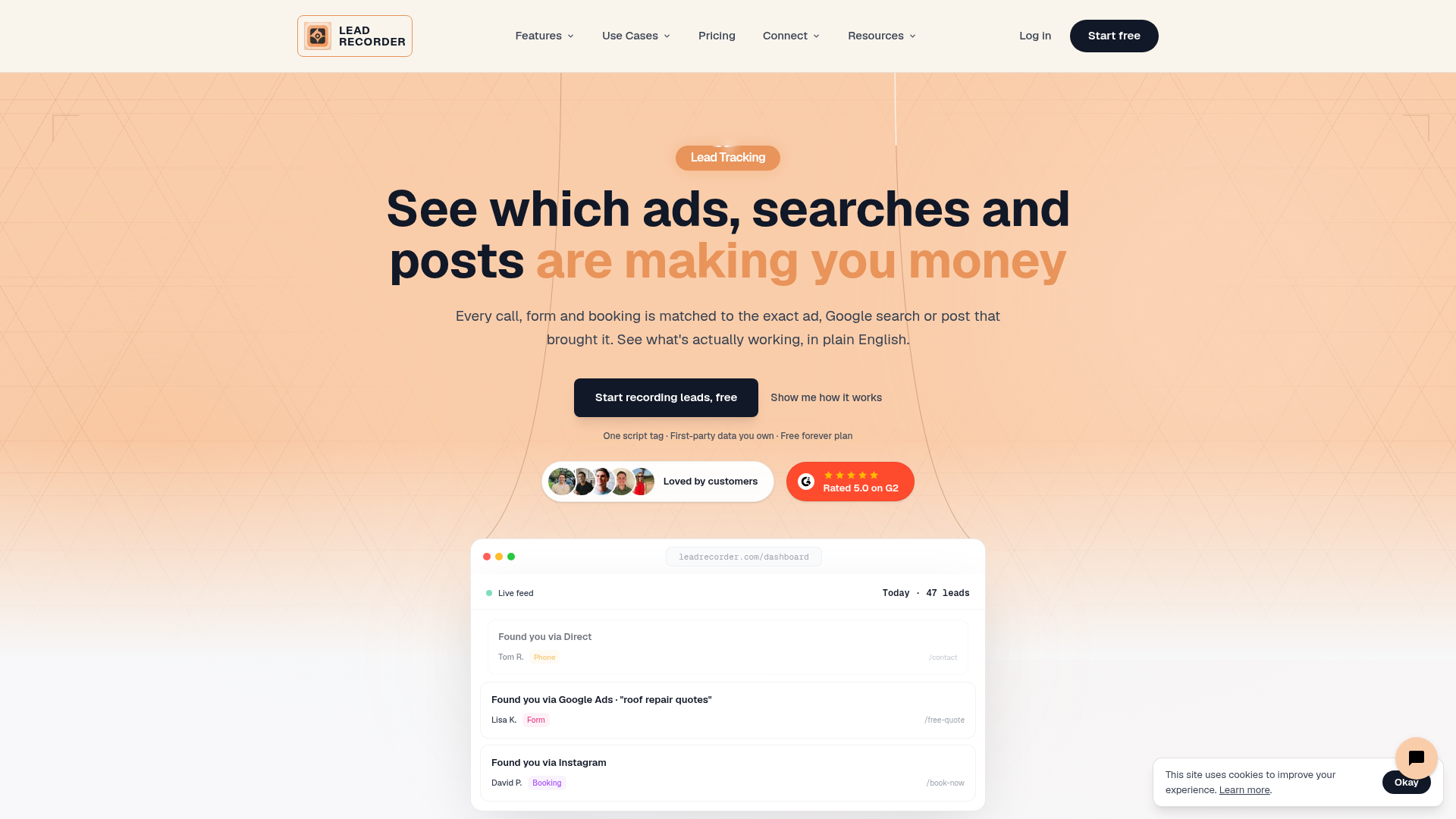
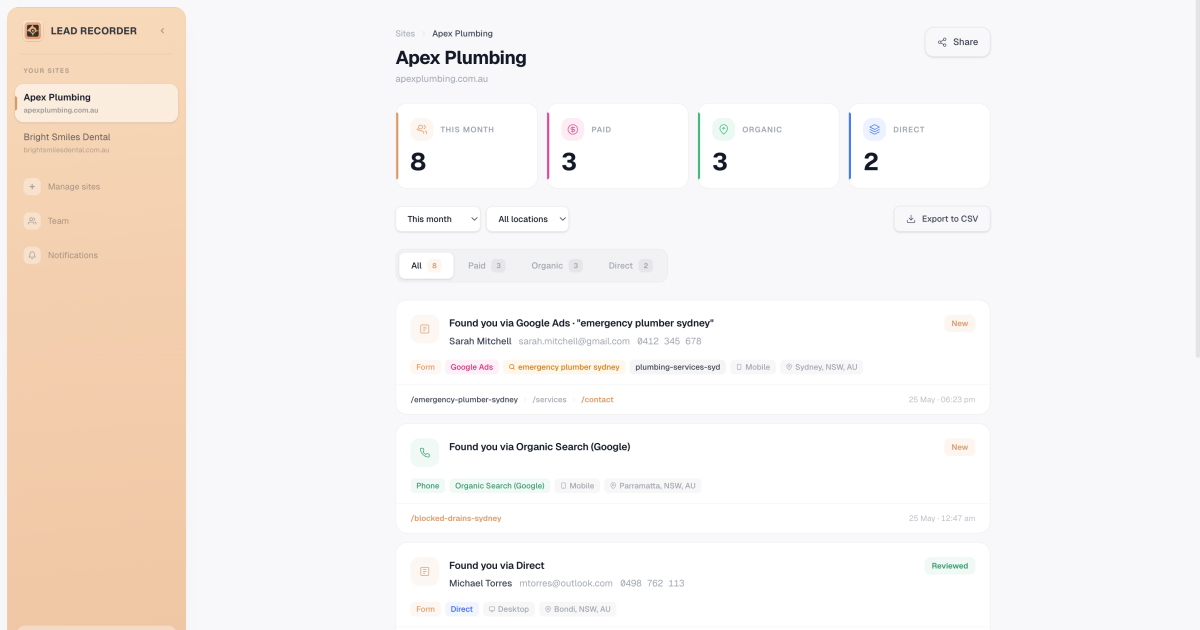
Most analytics tools will tell you how many sessions you had. Few will tell you the name of the person who called after searching "roof repair near me." Lead Recorder is built around that second question, and it's the reason the product feels less like another analytics dashboard and more like a lead feed with a memory.
The pitch is deliberately simple: drop one script tag into your site header, and every form submission, phone click, and booking gets matched to the exact ad, keyword, or post that brought it. No GA4 property setup, no conversion events, no sessions to decipher. The output is a live feed of named leads—Sarah Mitchell, submitted your contact form, via Google Ads, "roof repair near me"—that reads like a sales notification rather than a data report.
The GA4 gap: anonymous sessions versus named leads
GA4 is free, powerful, and practically indecipherable to the average business owner. Lead Recorder's homepage makes the contrast explicit with a side-by-side comparison: GA4 shows source/medium, campaign, sessions, and a question mark next to conversions. Lead Recorder shows a person, a channel, and the exact search term. The difference isn't just interface polish—it's a philosophical stance on what analytics should answer.
Where GA4 tracks anonymous sessions that age out after 2–14 months, Lead Recorder identifies the actual lead every time. That's not a minor feature; it's the product's entire reason to exist. The company's own marketing asks three questions it claims you can't answer with GA4: Which channel actually brought your last five leads? Was that a GA4 session, or a real person who called? Is the $2,000 in ads actually getting you customers? Lead Recorder answers all three in about 30 seconds, according to the site.
One script tag, three questions answered
The setup is a single line of JavaScript placed in the site header—the same spot you'd put a Facebook pixel. The site claims it works with WordPress, Webflow, Squarespace, Wix, Framer, GoDaddy, and anything else with a custom code field, plus Google Tag Manager. From there, the tool captures UTMs, referrer, landing page, device, and every page visit, storing it as first-party data without cookies and without a consent banner.
The 30-second setup is a direct challenge to the analytics status quo. GA4 requires property creation, data streams, and conversion event configuration; WhatConverts requires a script tag plus a number pool setup. Lead Recorder's one-tag approach is the entire installation. The tradeoff is depth: you get lead-level attribution and page journeys, but not the full behavioral analytics suite of a GA4. For a contractor or small agency, that's a fair exchange.
The agency proof problem and the shareable feed
Agencies have a chronic problem: proving ROI to clients without handing over a GA4 login and a 40-minute explanation. Lead Recorder's answer is the shareable link. Instead of screenshotting dashboards, an account manager sends a client a link to their lead feed. The client sees Sarah Mitchell, Google Ads, "roof repair near me," and the conversion. No training required.
The site's use-case pages lean into this. For agencies, the message is "prove ROI to clients without screenshotting GA4." For web designers, it's "clients used to ask if the site was working. Now they can see for themselves." The shareable feed isn't a bolt-on; it's the core mechanism for turning data into trust.
Why first-party data is the only data that matters now
Lead Recorder's homepage cites Supermetrics' 2026 Marketing Data Report, noting that 52% of marketing teams don't own their data strategy. The product's answer is first-party data by design: collected straight from your own site, owned by you, not rented from an ad platform. With third-party cookies on the way out, this is a forward-looking bet that attribution will increasingly rely on what you can capture yourself.
The site is careful to note that no consent banner is needed, which is a meaningful simplification for small businesses that don't have a legal team to vet cookie policies. The data is stored without cookies, which sidesteps a growing compliance headache. It's a positioning that turns a privacy regulation trend into a product advantage.
The pricing trap Lead Recorder refuses to set
Lead Recorder's pricing page is refreshingly flat: Free forever, $19/mo Starter, $49/mo Growth, and $199/mo Agency. No overage fees, no per-lead or per-minute charges. The free plan includes 1 site, last 10 leads, all lead types, and page journeys. The Agency plan includes unlimited sites, unlimited leads, white label, and priority support.
This is a direct contrast to legacy call-tracking tools like WhatConverts and CallRail, which the site's comparison pages explicitly call out for per-lead, per-minute, and per-number charges. Lead Recorder's flat pricing is a competitive weapon: it removes the fear of a surprise bill when a campaign suddenly performs. The tradeoff is that the free plan's 10-lead history might feel restrictive for a growing business, but the upgrade path is clear and affordable.
What the comparison table leaves out
The site's comparison table against WhatConverts and GA4 is thorough, but it glosses over a few things. It doesn't mention Lead Recorder's own limitations: no A/B testing, no heatmaps, no advanced segmentation. It also doesn't disclose the company's funding or team size, which is common for early-stage tools but worth noting for enterprise buyers.
More importantly, the comparison doesn't address the quality of the underlying attribution. Lead Recorder matches leads to the last touchpoint—the ad, keyword, or post that directly preceded the conversion. That's a last-click model, which can undervalue upper-funnel efforts. The site doesn't claim to solve multi-touch attribution, and for most small businesses, last-click is a massive improvement over no attribution at all.
Lead Recorder's bet is that the market doesn't need another analytics suite. It needs a tool that tells a business owner, in plain English, whether their ad spend is working. By focusing on named leads, shareable feeds, and flat pricing, it's carved out a niche that GA4 is too complex to fill and WhatConverts is too expensive to own. The product's biggest risk is that Google eventually simplifies GA4 enough to make the complexity argument moot. But for now, Lead Recorder has built something rare: an analytics tool that people might actually enjoy opening.