Popshot
A free, no-signup screenshot beautifier for quick, polished visuals
NewName Editorial
Editorial Team
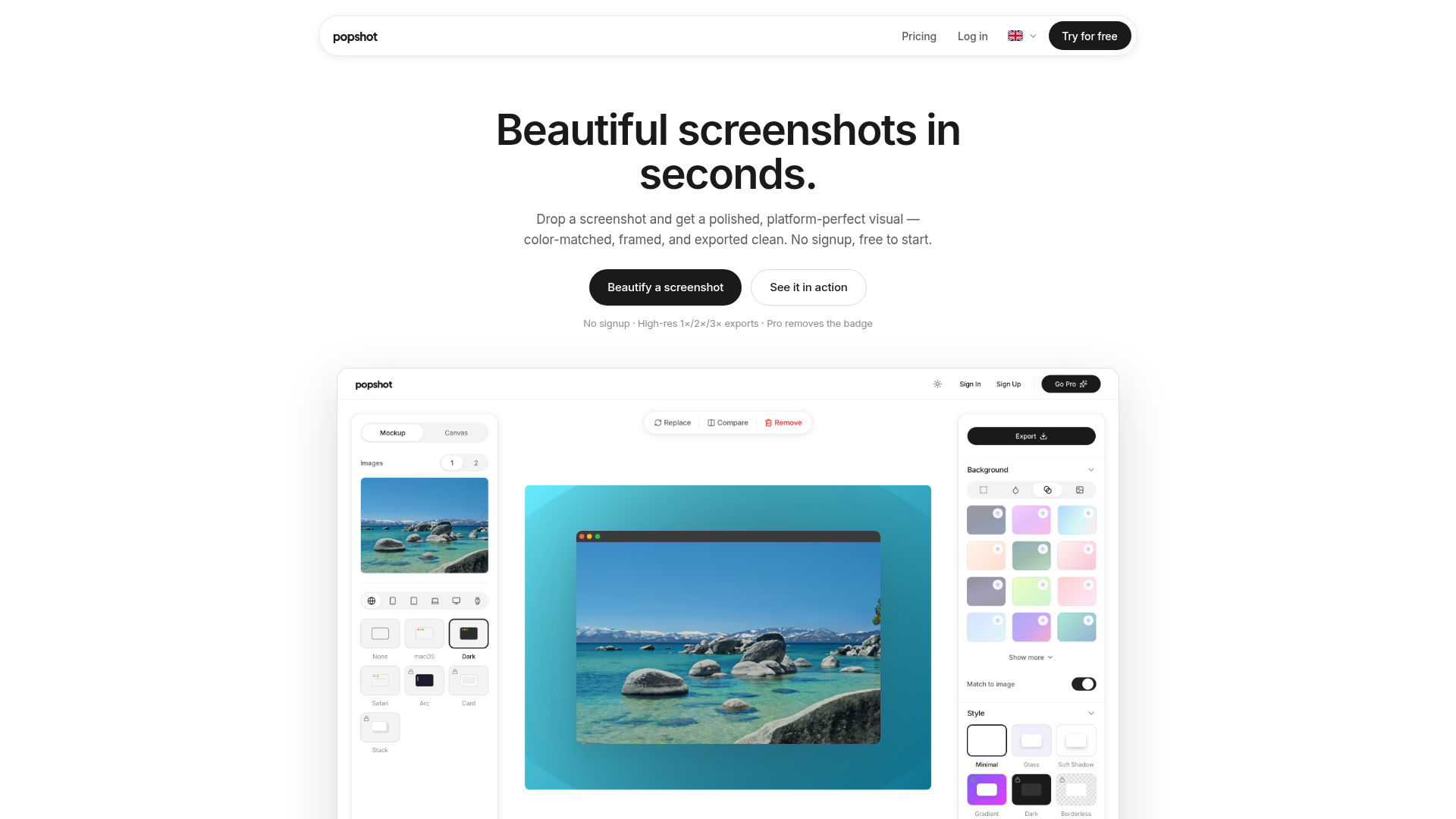
Popshot enters a crowded field of screenshot beautifiers with a simple pitch: for the 90% of the time when you just need a screenshot to look good quickly, you shouldn't need to install a heavy tool or create an account. It's a bold positioning that challenges the assumption that screenshot polish requires a dedicated desktop app.
The 90% screenshot problem
The website's comparison table makes Popshot's thesis explicit: heavier tools are for elaborate device scenes and animations, but Popshot is for the "other 90% of the time." This is a classic low-end disruption play, targeting the quick, frequent task of making a screenshot presentable for a Slack message, a tweet, or a landing page draft. Popshot isn't trying to replace CleanShot X or Xnapper for power users; it's aiming at the moment when a user just needs to export a decent-looking image without thinking about it.
This focus on speed is reflected in the product's core features. The "Match to Image" background automatically builds a backdrop from the screenshot's own colors, eliminating a manual design step. One-click device frames and browser mockups wrap the image in context, and a built-in redaction tool blurs sensitive info directly in the browser. These are the features that matter when you're in a hurry.
No install, no signup, no friction
The most radical thing about Popshot is that it requires no signup to start. You drop in a screenshot, and you're editing. This removes a significant barrier, especially for a tool that's often needed in the moment. The website emphasizes this repeatedly: "No signup to export," "No account needed to start." For a free tool, this is a powerful trust signal — there's no email capture, no trial period, just immediate utility.
This frictionless approach is a direct contrast to many competitors that require an account even for basic features. Popshot's browser-based nature also means it works on any device with a modern browser, without installation. This is a genuine advantage for users who are on a shared or managed computer, or who simply don't want another app cluttering their dock.
Platform templates as a silent feature
Popshot includes a set of platform-specific templates with exact dimensions: X post (1600 × 900), LinkedIn cover (1584 × 396), Instagram square (1080 × 1080), Dribbble shot (1600 × 1200), and Product Hunt (1270 × 760). The website's copy nails the pain point: "Stop Googling 'LinkedIn cover dimensions.'" This is a small but clever feature that saves time and prevents errors. It also positions Popshot as a tool for makers who are actively shipping to these platforms, not just for casual sharing.
These templates are built into the free plan, which is a strong value proposition. The user doesn't need to know the correct dimensions or worry about cropping; they just pick a platform and export. This is a differentiator that goes beyond the basic beautification features.
The badge: a clever freemium trade
The freemium model is straightforward: Free exports include a small "popshot.app" badge in the corner, while Pro ($9/month or $79/year) removes it. This is a classic trade — the user gets full functionality for free, but the badge serves as a form of advertising for Popshot. The badge is a small price to pay for a free, high-quality export, and it's a clever way to grow the product organically.
The FAQ is explicit about the catch: "No catch on quality — free exports are full-resolution PNG or JPG with every template and platform included. The only difference from Pro is a small 'popshot.app' badge." This transparency is refreshing and builds trust. For many users, the badge is a non-issue, especially for internal or informal sharing. For those who need a clean export for a client or public launch, the Pro tier is a reasonable $9/month.
Naming and the popshot aesthetic
The name "Popshot" is a portmanteau of "pop" and "screenshot," evoking a quick, vibrant, and slightly playful aesthetic. It suggests a tool that makes screenshots "pop" — stand out visually. The name is short, memorable, and easy to type, and the .app domain reinforces its software nature. The brand voice is informal and direct, using phrases like "Drop a screenshot and get a polished, platform-perfect visual." This aligns with the product's promise of speed and ease.
The name also carries a subtle nod to the "pop" of a camera flash or a graphic element, which fits the tool's purpose of making images more visually appealing. It's a strong name for a consumer-facing utility, and it avoids the generic "Shot" or "Snap" suffixes that are common in the category.
Where Popshot fits and where it doesn't
Popshot is not for everyone. If you need elaborate 3D device scenes, animations, or video exports, you'll still need a heavier tool like CleanShot X or Xnapper. Popshot's feature set is deliberately limited: it focuses on frames, backgrounds, annotations, and redaction. This is a conscious trade-off — the tool is fast and simple because it doesn't try to do everything.
The product's sweet spot is the maker, marketer, or support agent who needs to share a quick visual that looks intentional. It's also ideal for teams that want a consistent look for screenshots without enforcing a complex design system. The free tier makes it a low-risk tool to adopt, and the Pro tier is affordable for those who need the extra polish.
The risk of being the lightweight option
The biggest risk for Popshot is being perceived as a toy. The free tier, no-signup approach, and simple feature set could lead some users to dismiss it as not powerful enough. However, the company is betting that the majority of users don't need that power — they need speed and simplicity. The comparison table on the website directly addresses this, positioning Popshot as the tool for the "other 90% of the time."
Another risk is the badge. While it's a clever growth hack, it could be a turnoff for users who need a clean export for professional purposes. The Pro tier solves this, but it's a potential friction point. However, the transparency about the badge is a positive signal, and the pricing is reasonable.
Overall, Popshot is a well-executed product with a clear thesis: screenshot beautification should be fast, free, and frictionless. It's a strong option for anyone who needs a polished visual without the overhead. The name, the design, and the pricing all reinforce this positioning, making it a compelling choice in a crowded category.