Impact-Site-Verification: 41b53a0c-6d04-458b-a457-fe9e29acde1a

AI & Machine Learning·Unknown··5 min read

VocalVia

Turn documents into editable multi-voice podcasts with script-first control.

NN

NewName Editorial

Editorial Team

VocalVia product image 1
VocalVia product image 2

Most text-to-speech tools treat your document as a script to be read aloud. VocalVia treats it as raw material for a production. The difference sounds subtle, but it changes the entire workflow: instead of pressing 'generate' and hoping for the best, you get a structured outline, an editable script, and a cast of voices you approve before any audio is synthesized. It's a bet that the future of document consumption isn't just listening — it's listening to something that was actually produced.

The script-first bet: why VocalVia isn't just another TTS tool

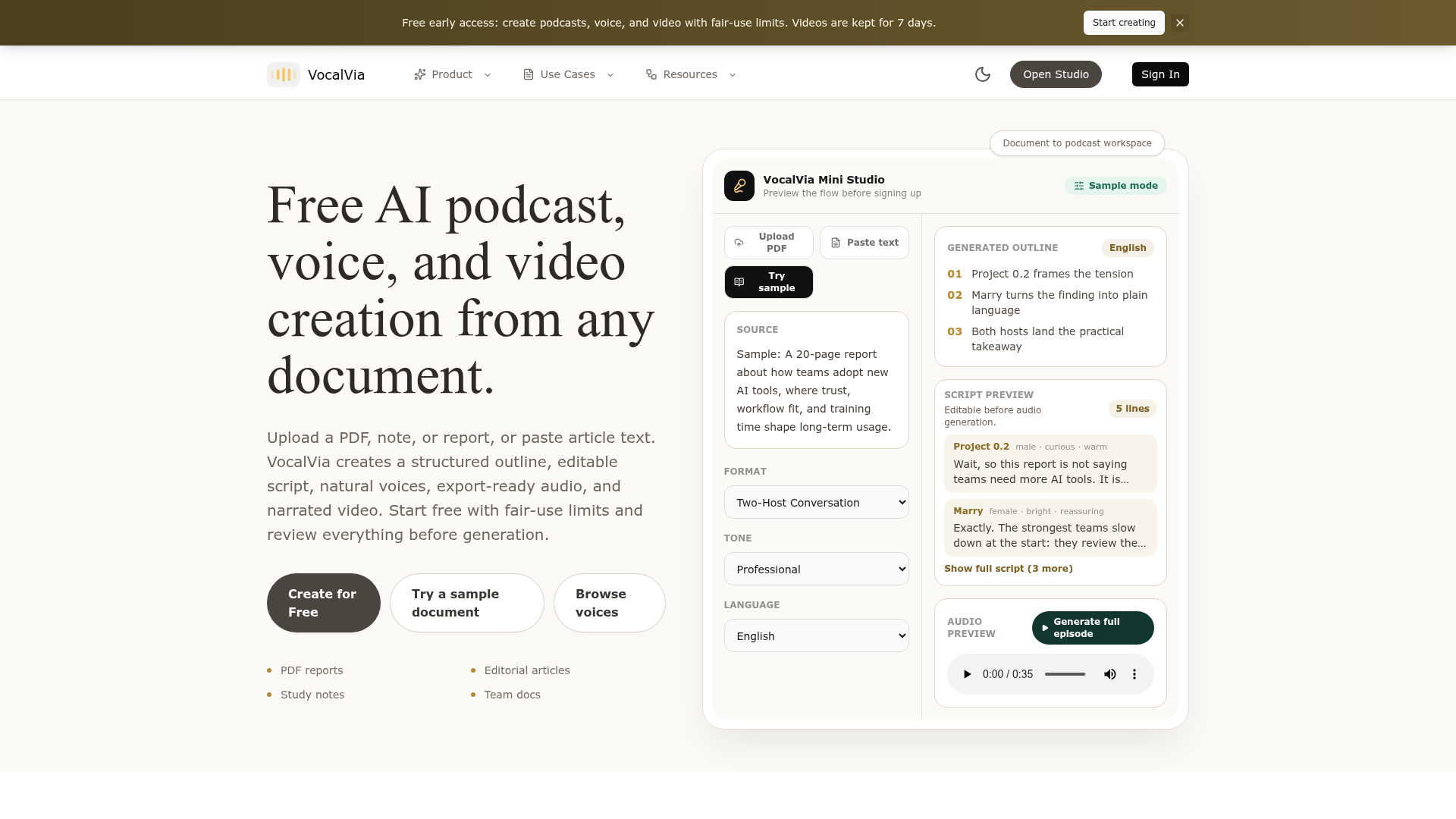
The text-to-speech category has long been dominated by tools that convert text to audio with a single voice and minimal control. VocalVia's positioning explicitly rejects that model. The homepage declares: "Not just text-to-speech. A source becomes an episode plan." That's not marketing fluff; it's a product architecture decision. Instead of a simple read-aloud, VocalVia generates a structured podcast draft with roles, pacing, and a script you can edit first. The input is a 20-page research paper; the output is a 5-minute episode with a two-host interview, an editable outline, and an audio preview. This script-first approach means the user's job shifts from 'reviewing a recording' to 'producing a show.' It's a subtle but crucial reframing.

From PDF to podcast: the workflow that puts editing before audio

VocalVia's workflow is deliberately staged: upload a source (PDF, Word, Markdown, web article, or pasted text), choose a script format (Single Narrator, Two-Host Interview, Study Tutor, Business Briefing, or Research Breakdown), edit the script, then generate audio. The key is that editing happens before any credits are spent on audio. This is a cost-control feature as much as a quality feature. The site emphasizes: "Review before generation" and "Edit the outline and script at every step before spending credits on audio." For users who have burned credits on a TTS tool that mispronounced a name or missed the point, this is a relief. It also enables a more thoughtful workflow: you can tighten the narration, adjust tone, and add custom instructions before committing to synthesis.

Directing the episode: roles, tags, and the producer's mindset

VocalVia doesn't just let you edit text; it lets you direct the performance. The script editor supports host roles, emotion tags, section markers, and pacing cues. For example, you can write [Host A][curious] or [Expert][calm] to shape how each line is delivered. This is more than emotion control; it's podcast structure. You can mark key points, summaries, and transitions, effectively producing the episode before the voices even speak. This is a significant step beyond typical TTS tools, which often treat the script as a flat string of text. It positions VocalVia as a tool for creators who think like producers, not just readers who want a hands-free version of an article.

A voice library that doubles as a casting call

VocalVia offers a voice library that you can browse without signing in. Voices are tagged by language, gender, age, and speaking style — 'Sarah' is an energetic young female voice, 'Narrator' is a deep, authoritative male voice, and there's a popular Chinese voice with 1.6K likes. This library is not just a list; it's a casting call. You can audition voices before you commit to a project, and the site encourages you to "pick a voice only when you are ready to generate in the studio." The library also supports voice cloning for consistent podcast branding, which is a differentiator for teams that want a recurring host. The ability to preview voices without an account lowers the barrier to entry and makes the product feel more like a production studio than a utility.

The trust layer: review, privacy, and the 'fair-use' promise

VocalVia is designed for documents that need careful handling: reports, study notes, business docs. The site emphasizes review, editing, and user control. It promises that your documents are used only to generate your podcast, never for model training, and that you can delete them anytime. This is a trust signal that matters for professionals dealing with sensitive material. Additionally, the free early access tier comes with 'fair-use limits,' and videos are kept for only 7 days. This suggests a cautious, resource-conscious approach to AI generation, which is refreshing in a category where 'unlimited' often means 'uncontrolled.' The trust layer is not just a feature; it's a positioning statement: VocalVia is for people who need to handle documents with care.

Naming the category: what 'VocalVia' signals and what it risks

The name 'VocalVia' is a portmanteau of 'vocal' and 'via,' suggesting a path through voice. It's catchy and hints at the core function: voice as a medium for content. However, it doesn't explicitly mention 'podcast' or 'document,' which could be a double-edged sword. On one hand, it allows for expansion beyond podcasts (the Video Studio is already an early preview). On the other hand, it might not immediately signal to a user searching for 'PDF to podcast' that this is the tool they need. The domain vocalvia.com is clean and memorable, and the brand is consistent across the site. The tagline, "Turn documents and articles into editable multi-voice audio," is specific and does the heavy lifting. The name's risk is that it's slightly abstract, but the tagline and the product's clear workflow mitigate that. Overall, the naming is a reasonable bet on a category that is still forming.

VocalVia is not a revolutionary leap in AI audio, but it is a thoughtful refinement. By putting the script first, it gives users a level of control that generic TTS tools lack. For educators, content creators, and teams who need to repurpose long-form content, it offers a workflow that feels more like production than transcription. The open questions are whether the fair-use limits will be too restrictive for heavy users, and whether the video studio will mature into a full product. But for now, VocalVia's script-first approach is a distinctive and valuable take on document-to-audio.