LectureToBook
Turn recorded lectures into polished, editable books with predictable pricing and preserved slide figures.
NewName Editorial
Editorial Team
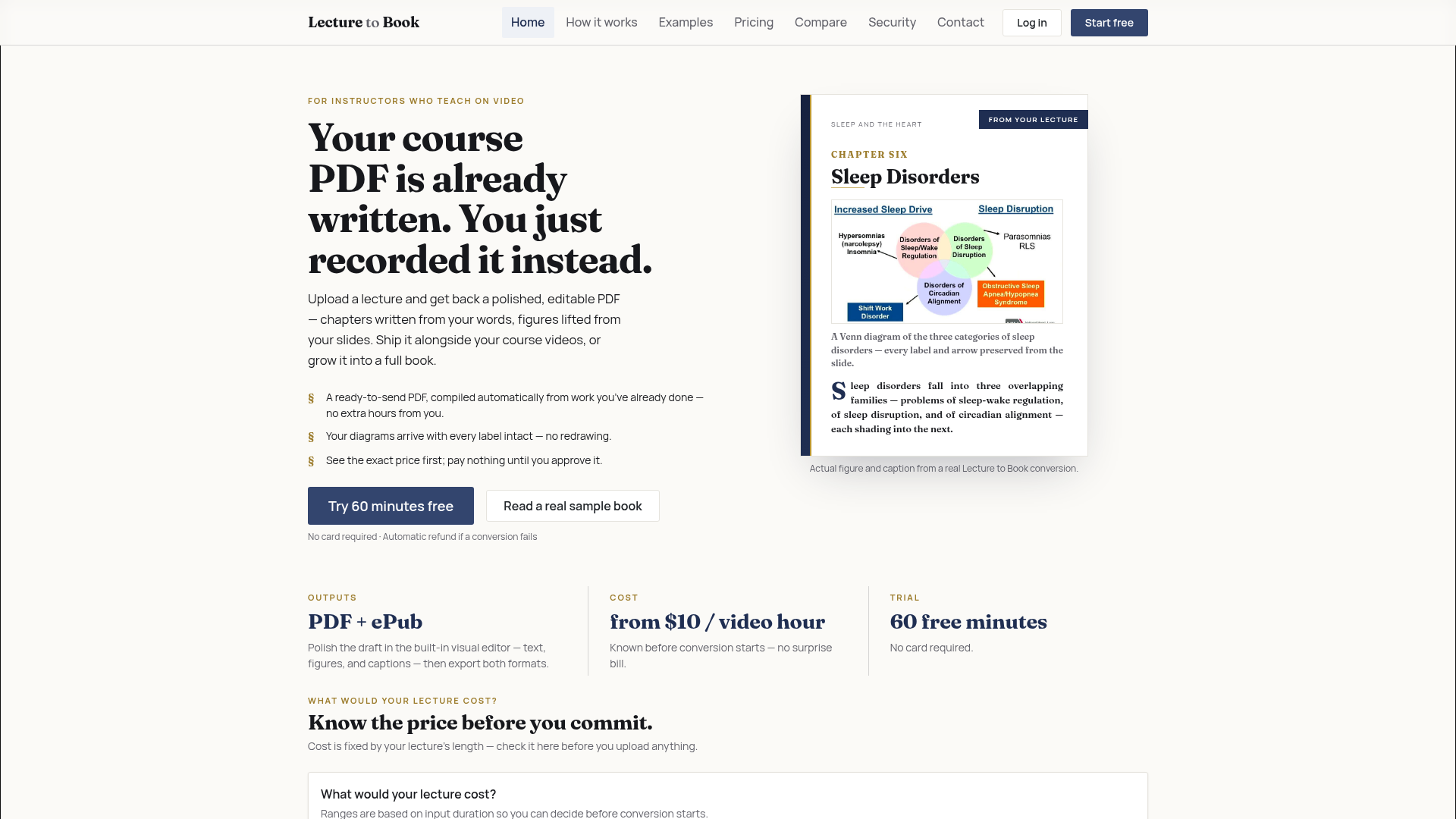
The pitch on LectureToBook's homepage is disarmingly simple: "Your course PDF is already written. You just recorded it instead." It reframes the messy, time-consuming work of turning a lecture video into a readable document as a conversion problem, not a writing problem. For instructors with years of recorded material, that's a compelling promise — and one that the product's design backs up with a pricing model and figure handling that feel genuinely thought through.
The lecture is the manuscript
Most educational content tools treat video as the primary artifact and text as a byproduct — a transcript to be searched or captioned. LectureToBook inverts that. It treats the lecture as a manuscript that happens to be spoken, and the book as the natural output. The homepage shows a real example: a chapter on sleep disorders, complete with a Venn diagram extracted from a slide, its labels and arrows intact. The message is clear: this isn't a transcript dump. It's a structured document with chapters, sections, and figures — the kind of thing you could hand to a student or a publisher.
The sample book, generated from an actual NIH lecture, runs about 10,000 words across 8 chapters and 24 sections, with 14 figures kept. Those numbers are modest, but they signal a key design choice: the output is a draft, not a finished manuscript. The product's job is to get you from a recording to a publishable draft in one upload, and it does that by compressing the traditional pipeline of transcript → editor → export tool into a single project context.
A price tag before the upload button
LectureToBook's pricing is its most distinctive feature. You pay by the minute of lecture you upload, and the price is fixed the moment you pick a video. The homepage includes an interactive calculator: enter a lecture duration and an optional hourly value, and it shows the cost range ($10–$14.50 for a 60-minute lecture), the estimated processing time (21–60 minutes), and the estimated manual time saved (3 hours, worth ~$225 at a $75/hour rate). The cost depends only on lecture length and which credit pack you buy — no surprise bills.
This is a deliberate contrast to the typical SaaS subscription model. You don't pay a monthly fee to have the tool available; you pay for the actual conversion work. Credit packs range from $29 for 2 hours to $300 for 30 hours, with effective rates dropping from $14.50 to $10.00 per hour. There's also an optional membership for regular converters, but it's not required. The pricing page even promises that purchased credits never expire and that failed conversions are refunded automatically.
The transparency extends to the quality tiers. Standard costs 1× credits, Premium costs 2.5× credits, and the site claims Standard scores on par with Premium on internal quality evaluations. That's a bold claim, but it's presented as a way to help users make an informed choice, not as marketing fluff.
Figures that arrive with their labels intact
One of the hardest parts of converting a lecture to a book is handling figures. Slides are full of diagrams, charts, and screenshots, and in a typical transcript-to-book pipeline, those figures are either lost, or they require manual extraction and re-labeling. LectureToBook's proof section is devoted to this problem. It shows a Venn diagram of sleep disorders, a labeled human-cell diagram, and a survival-probability chart — all extracted from real lecture slides with their labels intact.
The site calls these "real figures, real captions, real output," and they're not mockups. This is the kind of detail that matters to instructors who have spent hours redrawing diagrams for a textbook. If LectureToBook can reliably lift a figure from a slide and preserve its labels, it saves not just time but also the frustration of re-creating visual content.
The proof section also includes a sample outline, so you can see how the book's structure emerges from the lecture's narrative arc. The example shows a clear chapter-and-section hierarchy, which suggests the tool is doing more than just transcribing — it's identifying the logical flow of the lecture and organizing it into a readable document.
The instructor's workflow, compressed
The "How it works" section is refreshingly short: upload a recording, approve the estimate, download your book. There are three steps, and the site emphasizes that you can edit and export from the same project. The built-in visual editor lets you polish text, figures, and captions before exporting to PDF or ePub. This is a significant departure from the manual workflow, which involves multiple handoffs between transcript, editor, and export tools.
The site also sets expectations about quality. It lists conditions for best results — clear audio, readable slides, a clear narrative arc — and acknowledges that sparse slides or occasional interruptions can still work, but may require more editing. This honesty is refreshing. It tells you upfront that the draft is a strong first pass, not a final edit, and that unusual or low-quality sources may need extra work.
For independent instructors, course creators, and training teams, the value proposition is similar: turn an existing lecture archive into a book without starting from scratch. The site even suggests you can "grow it into a full book," implying that the tool can handle longer projects, not just single lectures.
What the conversion still asks of you
Despite the automation, LectureToBook is clear about the division of labor. You still need to review the draft, clean up unusual sources, and make editorial decisions. The tool handles the heavy lifting of transcription, figure extraction, and structure, but it doesn't replace the instructor's judgment.
This is a realistic positioning. The tool is not claiming to write a book for you; it's claiming to turn your recorded words into a structured document you can edit. The pricing model reinforces this: you pay for the conversion, not for the writing. The free trial — 60 minutes after email verification, no card required — lets you test the quality on your own material before committing.
LectureToBook is a niche tool with a clear thesis: the lecture is the manuscript, and the book is just a format shift. For instructors with a backlog of recorded material, that shift could be worth the price of admission.