NormalMap AI Charges for AI Color, Not for Local PBR Conversion
CrazyTools Studio's browser PBR suite: free WebGL conversion from your albedo to normal/roughness/AO/metallic maps, with credits only for AI-generated diffuse textures and text-to-PBR workflows.
NewName Editorial
Editorial Team
Game artists do not lack normal map tutorials—they lack a full PBR set from one photo without opening Substance or uploading client textures to Adobe's cloud. NormalMap AI, operated by CrazyTools Studio, draws a sharp revenue line: upload your own diffuse/albedo and derive normal, roughness, displacement, ambient occlusion, metallic, height, and ORM maps locally in the browser for free; pay credits only when AI invents the base color texture from a text prompt or seamless generator. Judge it on whether your Unity import looks correct under a moving light—not on whether it replaces Substance 3D Sampler's entire material lab.
The product is a pipeline split, not a single generator
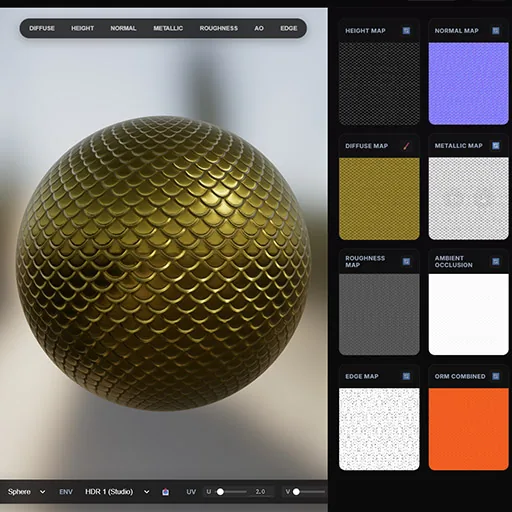
Traditional workflows force a fork: bake normals from high-poly meshes in Blender, paint in Substance Painter, or run crude Photoshop height-to-normal filters. NormalMap AI collapses the 2D→PBR path into one browser session with real-time 3D preview (sphere, cube, plane, cylinder) and DirectX/OpenGL normal orientation toggle—critical for Unity (Y+) vs Unreal (Y-) without manual channel flips.
Two distinct pipelines share one UI:
Pipeline A — Local conversion (free forever):
- Upload any diffuse map, photograph, or hand-painted albedo
- GPU-accelerated extraction via WebGL on your device
- Outputs: normal, roughness, displacement, AO, metallic, height, ORM
- Seamless texture maker tiles edges for environment work
- Transparent PNG maker for quick asset prep
- No account required; images never uploaded
Pipeline B — AI generation (credit-metered):
- Text-to-texture: prompt → seamless diffuse → auto-run through Pipeline A
- AI seamless texture maker for tileable materials from scratch
- Starts at 1 credit per image; requires authenticated account
- Higher resolution and priority queue on paid tiers
The founder clarified on Unity Discussions: "If someone only uses the local texture-to-PBR workflow, it is free." Credits apply when AI creates the color source, not when you bring one.
Business model: free utilities, subscription for AI volume
NormalMap AI uses freemium with credit accounting, processed via Creem as merchant of record (Terms of Service, updated April 2026).
| Tier | Price | Credits | Best for |
|---|---|---|---|
| Local tools | $0 | N/A | Albedo→PBR, seamless tiling, 3D preview |
| Free account | $0 | 5/day + 10 signup bonus | Occasional AI textures |
| Lite | $8.90/mo | 2,000/mo at 1024×1024 | Hobbyists, standard queue |
| Pro | $19.90/mo | 5,000/mo | Professionals, priority queue |
| Premium | $34.90/mo | 10,000/mo | Higher resolution support |
| Annual | $249.90/yr | 11,000/mo | ~50% savings vs monthly |
| Credit packs | One-time | Starter / Pro packs | Burst projects without subscription |
Credit rules: Subscription credits do not roll over between billing periods. One-time top-up credits never expire. NSFW generation is automatically blocked per Acceptable Use Policy.
IP ownership: You retain full ownership of all generated PBR outputs; NormalMap AI claims a limited license only to display textures in your account dashboard (Terms). Outputs are marketed as commercially safe and royalty-free.
Why this model works: Local WebGL conversion costs CrazyTools Studio near-zero marginal compute. AI diffuse generation hits server inference—credits align revenue with GPU spend. Free local tools act as acquisition and trust-building for indie devs who later need text-to-PBR volume.
Product surface: what ships in one export
From a single input image, artists get:
- Normal map with adjustable strength and blur
- Roughness and metallic for PBR shading
- Displacement/height with depth slider
- Ambient occlusion derived from surface inference
- ORM packed maps where engines expect combined channels
Workflow features:
- Real-time lit 3D preview before export
- Batch queue for multiple images (sequential processing)
- Seamless edge blending for floor/wall/terrain textures
- DirectX vs OpenGL normal flip—one click, no Photoshop channel surgery
Target users:
- Indie game developers prototyping materials before engine import
- Technical artists testing albedo swaps without rebaking in Substance
- Architectural viz artists converting photo references to tileable walls
- 3D printing hobbyists needing height/displacement from flat references
Honest ceiling: Complex organic materials (skin, brushed metal with anisotropy) still beat dedicated desktop tools. NormalMap AI wins the 80% case—brick, fabric, wood, concrete from a phone photo.
Competitors: local browser vs desktop subscription
| NormalMap AI | Adobe Substance 3D Sampler | SmartNormal / NormalMap-Online | ArmorPaint | |
|---|---|---|---|---|
| Core job | 2D→full PBR set + AI diffuse | AI material authoring + 3D capture | Height→normal only | Real-time 3D PBR painting |
| Install | Browser only | Desktop app | Browser | Desktop |
| Local privacy | WebGL local for Pipeline A | Cloud AI processing | Local, basic | Local |
| Multi-map output | Yes (5+ maps) | Yes (full suite) | Normal only | Paint-based |
| AI text-to-material | Credits | Subscription (~$15/mo) | No | Limited |
| Price entry | Free local; AI from $8.90/mo | ~$14.99/mo | Free | One-time purchase |
| Sweet spot | Quick browser tests, privacy | Studio-grade material lab | Simple height conversions | Direct mesh painting |
Choose NormalMap AI when you need a full PBR export from your own texture in under a minute, in the browser, without Adobe installation—or occasional AI-generated tileables on a $8.90 budget.
Choose Substance 3D Sampler when you need material mixing, 3D scan ingestion, and Adobe ecosystem integration for production assets.
Choose SmartNormal when you only need a free normal from a height map and will hand-paint the rest.
China: indie dev workflows vs compliance defaults
NormalMap AI has no China-specific product—relevance is Chinese indie studios and technical artists building for global Steam/mobile releases.
What fits mainland workflows:
- Free local albedo→PBR suits teams avoiding upload of unreleased game textures to US cloud services
- Browser tool needs no VPN-dependent desktop license—usable on shared dev machines
- Unity community traction (official Discussions showcase) matches China's large Unity indie base
- Low $8.90/mo entry vs Substance for students and solo creators
Friction:
- Payments via Creem / international cards—no documented Alipay/WeChat
- AI generation (Pipeline B) sends prompts and may store outputs on servers—数据出境 review for AAA studios with source-art custody rules
- English-first UI and
.aidomain—discoverability relies on search, not domestic marketplaces - WebGL performance varies on integrated GPUs common in budget laptops
Practical split: Pipeline A for local reference→PBR on any machine; Pipeline B only after legal clears cloud AI; production polish still in Substance or domestic DCC pipelines for ship-quality assets.
Name and domain (briefly)
- NormalMap AI is deliberately descriptive—game devs search "normal map generator," not poetic brand names
normalmap.aiexact-match .ai TLD signals AI diffuse generation; local tools remain free regardless of TLD trends- Trademark weakness is the trade-off for SEO clarity
Five-minute material drill before you subscribe
- Upload a production albedo (not a gray height map)—export all maps and import into Unity/UE
- Toggle DirectX/OpenGL—confirm lighting looks correct without manual channel invert
- Test seamless maker on a brick or fabric photo—check tiling in engine, not just preview sphere
- Burn free daily credits on one text prompt—compare AI diffuse quality vs your manual albedo
- Calculate monthly credits: count how many AI textures you ship per sprint; Lite (2,000) vs Pro (5,000) vs one-time pack
What to verify before pipeline adoption
- Free vs paid boundary—team policy should default to Pipeline A for client textures; Pipeline B only for generic tileables
- Engine convention—set Y+/Y- correctly per target (Unity vs Unreal)
- Commercial terms—paid tiers allow commercial use; confirm for shipped game assets
- Quality ceiling—run hero assets through Substance comparison before committing art direction
- China AI path—local conversion OK for sensitive art; text-to-PBR may need compliance sign-off
NormalMap AI's business is honest metering: the PBR math that can run on your GPU stays free; the color invention that requires server GPUs costs credits. For indie developers who need normal + roughness + AO in one browser tab before engine import, that split is the product. It will not replace Substance in a 200-person art department—but it can shrink the gap between "I have a photo" and "I have a material."