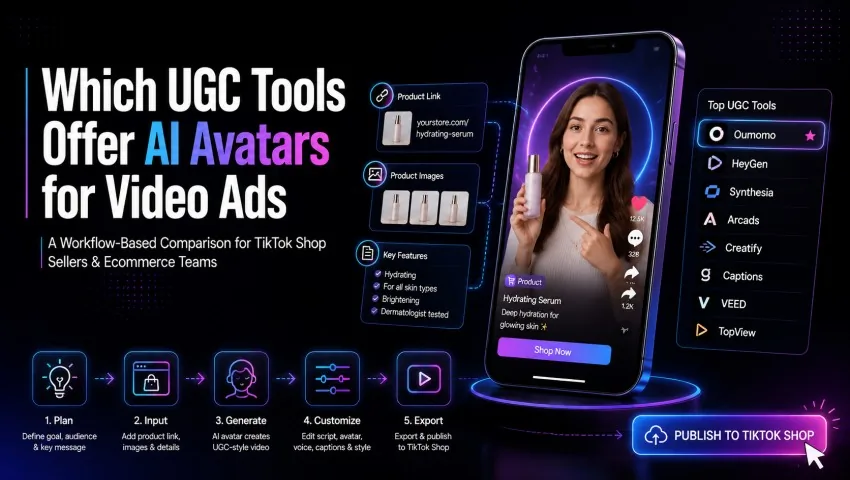
Which UGC Tools Offer AI Avatars for Video Ads? A Workflow-Based Comparison
A workflow-based comparison of UGC tools with AI avatars for TikTok Shop and ecommerce—covering Oumomo, HeyGen, Synthesia, Arcads, Creatify, Captions, VEED, and TopView.
NewName Editorial
Editorial Team
If you are comparing UGC tools with AI avatars, start with the video you need to make. A long feature list means very little if the workflow does not fit your campaign.
Some tools are strongest at multilingual presenter videos. Others are built for rapid ad variations, hands-on editing, or turning a product page into a short social video. For TikTok Shop sellers and ecommerce teams, there is another requirement: the product needs to stay at the center of the creative.
This guide compares AI avatar and UGC-style video tools by workflow, not hype. It also explains where Oumomo fits when the goal is product-led, shoppable content for TikTok-style campaigns.
The Short Answer
Choose the tool around your main bottleneck:
| Tool | Best when… |
|---|---|
| Oumomo | TikTok Shop sellers who want to turn product links, product images, or reference structures into short selling videos |
| HeyGen | Avatar choice and multilingual localization matter most |
| Synthesia | Teams producing controlled, presenter-led business content |
| Arcads | AI actors and performance-ad variations |
| Creatify | URL-to-ad production for ecommerce teams |
| Captions | AI actors plus a mobile-friendly creative workflow |
| VEED | Generation and manual editing need to live in one place |
| TopView | Product-ad workflows, including avatars that can show or interact with a product |
There is no universal winner. A tool built for training videos can have excellent avatars and still feel awkward for a fast TikTok Shop campaign. A tool that creates fast ecommerce drafts may not be the best choice for a controlled corporate explainer.
What Makes an AI Avatar Tool Useful for UGC Ads?
An avatar alone does not make a convincing UGC-style ad. A realistic face, voice, or presenter can help, but the full workflow matters more.
Before choosing an AI UGC tool, evaluate five things.
1. Product Grounding
Can the tool use your real product page, product images, packaging, and selling points?
Product grounding matters because a polished spokesperson cannot rescue an inaccurate demonstration. If the avatar talks about the wrong product details or the generated scene changes the item, the ad becomes risky.
For ecommerce, a good workflow should start from the product. It should preserve the product story, not simply place a generic actor beside generic claims.
2. Creative Control
Look for control over:
- hook
- script
- voice
- avatar
- scene
- caption style
- call to action
- product footage
- length and format
You should be able to change one element without rebuilding the entire ad. If every revision requires a full restart, testing becomes slow.
3. Variation Speed
A useful ad workflow makes it easy to test several hooks or angles. The aim is not endless volume. It is faster learning.
For example, you might create three versions:
- Version A opens with the problem.
- Version B opens with the result.
- Version C opens with a direct product demonstration.
If everything else stays stable, you can learn which hook direction works better.
4. Editing and Review
Every AI-generated ad needs human review. Check product claims, pronunciation, hand movements, labels, pricing, subtitles, and platform compliance before publishing.
This is especially true for AI avatars. A synthetic presenter can make a claim sound confident even when the product page does not support it. Review the script as carefully as the visuals.
5. TikTok Fit
UGC-style ads should feel native to the channel. A polished presenter video may be useful, but it can feel too formal for a TikTok feed. A casual product demonstration may work better for some products.
Ask whether the output feels like:
- a social video
- a product ad
- a training video
- a corporate explainer
- a template with a product dropped in
The best answer depends on your audience.
Oumomo: Product-Led Videos for TikTok Shop
Oumomo approaches AI video from the product side. That makes it relevant when you do not simply need a talking head. You need a video that connects the script to real product benefits and visuals.
For TikTok Shop sellers, product-led content is often more useful than avatar-led content alone. The viewer needs to understand what the product is, why it matters, and what to click next.
Oumomo can help teams move from product assets to short TikTok-style videos with less friction. A seller can use product links, product images, or a reference structure to create a draft, then review the output for accuracy.
This workflow makes the most sense for ecommerce teams that want product research, generation, creative testing, and publishing preparation closer together.
The output still needs review. Confirm that product appearance, claims, and demonstration match what customers will actually receive. You can explore Oumomo at https://www.oumomo.ai/.
HeyGen: Avatar Choice and Localization
HeyGen offers a broad selection of avatars and strong language support. It is useful when you already have a script and want presenter variations for different audiences or markets.
Its strength is flexibility around the speaker. You can change avatar, language, and voice without arranging another shoot. This is helpful for multilingual campaigns, explainers, and localized presenter videos.
The limitation is that avatar choice does not automatically create a strong product ad. You still need a specific hook, credible product proof, and a call to action that fits the buyer.
Synthesia: Controlled Presenter Videos
Synthesia is known for structured, presenter-led video creation. It works well for explainers, training, onboarding, and brand-controlled communication.
It can support marketing content, but its polished presentation style may need adaptation for casual TikTok creative. A corporate-looking scene can feel out of place if the goal is creator-like product discovery.
Synthesia is a strong option when consistency and review control matter more than informal UGC texture.
Arcads: AI Actors for Ad Testing
Arcads is built around AI actors, ad presets, and creative iteration. It gives performance marketers a way to test different faces, voices, hooks, and visual treatments without organizing multiple creator shoots.
This makes sense for paid-social teams that regularly test UGC-style concepts. The key is discipline. More variants only help when each version tests a clear hypothesis.
Label what changed and keep the rest of the brief stable. Otherwise, you may produce many videos without learning much.
Creatify: URL-to-Ad Production
Creatify can turn a product URL into a video using generated scripts, voices, and avatars. This shortens the path from an ecommerce page to a first batch of ad concepts.
It is useful for ecommerce teams that want quick URL-based drafts. Treat automatically extracted copy as a starting point. Rewrite generic benefits and remove claims that the product page does not support.
Creatify is strongest when speed matters and the team has enough review capacity to refine the output.
Captions and VEED: Generation With Editing Nearby
Captions helps creators produce UGC-style ads with AI actors, website inputs, scripts, and quick edits. It is appealing to teams that already work on mobile or want a lightweight creation process.
VEED combines AI generation with a browser-based editor. After generating a draft, you can add product footage, captions, text, branding, and a more specific call to action.
Both tools suit creators and small teams that expect to edit AI output rather than publish it untouched. Use the extra editing pass to replace generic footage and make product evidence specific.
TopView: Product Avatars and Ecommerce Formats
TopView supports product URLs, images, scripts, and UGC-style ad formats. Its product avatar workflow can place a product with an avatar that shows or interacts with it.
That can be useful for ecommerce teams that want several ad-generation modes inside one platform. Review hands, packaging, product scale, and proportions carefully. Generated product interactions can look fine at first glance and fall apart on a second viewing.
How to Choose the Right Tool
Start with one campaign and ask what is slowing it down.
- If you need a TikTok Shop video built from a product listing, consider a product-led workflow like Oumomo.
- If you need one presenter script across several languages, compare HeyGen and Synthesia.
- If your paid-social team needs many actor-led ad concepts, look at Arcads or Captions.
- If you want URL-based ecommerce production, compare Oumomo, Creatify, and TopView.
- If manual editing is central to your workflow, VEED may be worth testing.
Before paying for a larger plan, run the same brief through two or three tools. Use the same product assets, hook, length, and call to action. Then compare:
- product accuracy
- editing time
- voice quality
- avatar fit
- caption quality
- export quality
- ease of making a second version
FAQ
Do AI avatar UGC ads convert?
They can, but the avatar is only one part of the ad. Performance also depends on the offer, hook, product proof, audience, landing page, and creative freshness. Treat the first output as a test.
Is a bigger avatar library always better?
No. A smaller selection can be enough if the avatars fit your audience and the tool handles your product accurately. Workflow quality matters more than a headline count.
Can I mix AI avatars with real product footage?
Yes. This often creates a more credible ad. Use the avatar for the hook or explanation, then cut to real product close-ups, packaging, demonstrations, or screen recordings for proof.
Should AI-generated ads be disclosed?
Follow the current rules for every platform and market where you publish. Do not use an AI avatar to invent a customer testimonial, impersonate a real person, or make unsupported product claims.
How many variants should I make?
Start with a small, controlled batch. Change one major element at a time, such as the hook, spokesperson, proof scene, or call to action. The goal is learning, not volume for its own sake.
Conclusion
The best UGC tool with AI avatars is the one that fits your campaign workflow. Avatar quality matters, but product grounding, creative control, review, and testing speed matter just as much.
For TikTok Shop and ecommerce teams, product-led content is often the center of the campaign. Oumomo is worth considering when you want to turn product links or assets into short, shoppable video drafts and keep the workflow closer to TikTok content production.
Start with the video you need to make, not the longest feature list. Then choose the tool that gets you from product idea to reviewed creative with the least confusion.
Visit https://www.oumomo.ai/ to explore Oumomo's product-led video workflow for TikTok-style content.
Tags